|
|

Home | High-End Audio Reviews | Audiophile Shows | Partner Mags | Hi-Fi / Music News |
|
 
|
30 Years Of Service To Music Lovers |
|
|
|
 High-Performance Audio Reviews
|
|
Summer 2008

The Max Rochlin Memorial
Cable™
Article By Steven R. Rochlin
Difficulty Level


Here is an oldie but a goodies. i originally designed this cable about twelve years ago. After many hours of careful listening and testing, this cable has been reviewed by a few people including appearing within Hi-Fi News. as reviewed by the esteemed Ken Kessler. This is basically a high-precision 75 Ohm cable that is great for digital audio (from transport to DAC) or as a standard RCA video cable. Back in the day, wow that makes me feel old, many of my reviewer friends have this cable in one form or another and are highly satisfied (there have been three generations of this cable by the way). Today i will cover a fourth generation while using my old photos from the original article. This cable requires some soldering, so time to get yours warm and happy! Striping wire, crimping, and soldering are really the only three talents you need. Of course there have been books written on how to properly solder so... To make the full fledged version you will only need to solder twice. In the end you will have a cable which will look totally pro plus sound and look great.
You can use this same basic method to make analog cables, loudspeaker wire, and virtually any other cable. Though be forewarned, the wire makes a difference, as does the end connectors you choose. Have tried various RCA connectors, and am sure that different power cable connectors, etc will sound different. This is why top cable manufacturer might either use ETI Bullet Plugs or those from Furutech. Also note i hate plated metals, as there may be something in the process of plating that causes problems that my ears are detecting. If you are making loudspeaker cables, consider eliminating end connectors completely and simply attach the bare wire (no solder) to the appropriate amplifier/speaker connector.
Are you ready? Well, here we go!
Parts Needed:
Caig Pro Gold 5% spray
(click
here for their website)
100% cotton pipe cleaner
Version 3: Canare RCA RCAP-C4F or BNC
BCP-C4F
(click
here for their website)
Version 4: ETI Bullet Plug (copper or
silver)
(Click here for their
website)
Belden 1505A coax cable
(click
here for their Web site)
Audio Note or Wonder Solder
*Techflex 1/8 to 7/16 inch
black mesh
(click here for their Web site)
*3/4 inch wide by 2 inch
long 3:1 heat shrink
(click here for their Web site)
Note: Items with a asterisk (*) are optional and only necessary of you want to dress up the cable to look pretty.
Tools Needed
Wire Stripper, $10 crimping tool for coax cable and scissors.
*High power hair dryer or heat shrink gun
*Good quality soldering gun
Note: Items with a asterisk (*) are optional and only necessary of you want to dress up the cable to look pretty.
Instructions:
Ok, first let us get one thing straight here. No matter what you do you must get Caig Pro Gold 5% spray as using the 100% pure Pro Gold is simply too powerful.

Center Pin Attached to the 1/4 inch of Stripped Wire
First things first. What you need to do is strip off 1/4 inch of the outer conductors leaving only the 1/4 inch of center wire exposed (strip it so that 1/4 inch of the center solid-core copper wire in now bare). Then you can either solder the gold center pin to it alone or for those who choose not to solder. Now please use the Caig Pro Gold and apply it using the cotton pipe cleaner to the center pin. This not only helps to clean the wire, it also makes it less likely to cause insertion loss, corrosion, and just makes life better in general. Life is good. Music is great. To the next step please and don't hesitate.

Soldering in Action
Now strip off 1/2 inch of only the outer plastic cover (red in photo above) so that now a 1/2 inch of braiding is exposed (see photo below). IMPORTANT: Make sure that there is no braiding or shielding wire touching, soldered, or connected center pin/wire. If so, this causes a short and you will not be happy and neither will the output or input of your components. You have been warned. i wash my hands of all liabilities. If you make this cable wrong and blow something up it is not my responsibility.
After making sure the center pin is free and clear with nothing from the outer foil or braid touching the center conductor, please spread only the braid (about 1/4 inch of the 1/2 inch total) leaving the center foil alone and tightly connected to the center white dielectric as shown below. Again making sure that neither the foil or braid wires touches the center wire/connector.
The below photos are if you use the Canare 75 Ohm plug, you can substitute the ETI Bullet Plug and adjust the instructions for making the appropriate connections accordingly. The ETI's have a wider bandwidth and provide a bit more transparency and upper-end frequency extension.

Braiding Spread but Center Foil Left Alone
Now please apply some Caig pro Gold to the center foil, the braiding, and also the inside of either the RCA or BNC connector you are going to use. This helps keep corrosion out, reduces insertion loss, and just makes for a happier connection. When you insert and push the center pin piece onto the outer connector piece you might feel a little "click". Not always, but usually. This means that the center pin has clicked into place properly. You will also notice that the center foil went nicely inside the center piece while the outer braid stayed outside the connector. Please use scissors to cut the excess of the braiding so that it just reaches the connector as shown below. Life is fun, music is grand, you're almost there so strike up the band!

RCA Connector With Braiding Cut to Size
Ok, it's time to slide the crimping ring on, but first use some more of that wonderful Caig Pro Gold on the inside of it too. Now slide the ring on the wire and please make a good solid crimp. After crimping you are now done with side one. Congratulations! It should look like the photo below (for RCA connector).
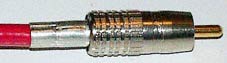
Finished Connector for Side One (RCA)
*Optional is to use Techflex black plastic mesh and heat shrink, as it makes the cable look professionally made. Slide on the Techflex on the non-terminated end until it reaches past the crimp ring of the terminated end but before the connector itself. You can cut the excess Techflex on the non-connectored side so that it achieves the appropriate length. At this time it is also best to have the heatshrink on the cable, as once you install the other connector these parts may not easily go over the connectors. Basically, you want all your supporting parts on the cable before you install the final connector. Once the Techflex and heat shrink are in place over the side with the connector, please use the high-powered hair dryer or heat shrink gun to shrink it over the Techflex. Please see the photos below for what a finished Techflexed and heat shrink connector looks like.

RCA With Heat Shrink

BNC and RCA
Ok, now it's time for side two. Simply make sure you first put on the crimping ring if you are using the Canare RCA end (with the Caig stuff coated in the inside), as the ETI Bullet Plug does need use a crimping ring so you can skip this accordingly. This way you won't start stripping wire only to realize that you must put on the tight fitting crimp ring. Please believe me, it is no fun forgetting to put on the crimp ring first. Simply begin like you did with side one. Make the appropriate wire stripping, soldering, etc. Once you are done it's party time! All you Techflex/heat shrink folks should please read on. There are some small details i do want to point out. Just some stupid mistakes i've made. The whole Techflex and heat shrink stuff is only for a more visually appealing cable. It has nothing to do with the electrical or functionality of the cable at it all. But hey, it makes the cable look more professional so...
When doing the second side all you Techflex/heat shrink folks, please put heat shrink over the Techflex and then slide back the Techflex. Do not shrink the heat shrink until after you have the connector crimped. After sliding the Techflex back with the heat shrink over it, put some of that Caig stuff on the inside of the center crimp ring and put it on the wire as well. Then strip the 1/4 inch of the center conductor and go from there just like we did at the beginning of this project as seen below. Reason is, i have forgotten to do this and it's hard to put on the crimp piece after i have pushed the RCA/BNC piece on.

Before Second Connector Installed
So there you have it! If you didn't use the Techflex and/or heat shrink don't worry. It just makes the cable look good.

Finished Cable!
(note BNC on one end and RCA on the other)
Steve's comments: First let me say that it takes about 30 minutes for a newbie to make a cable once you are all set and ready to go. An expert might take 15 minutes. Please give the cable about a week or so for the dielectric to get all good and happily broken in. i personally have a proprietary device which was specifically made to better "form" the dielectric material, though music for a week does nicely too. Over the week's time you will notice a smoothing out of the music yet more detail is heard as time passes. All you video folks will see a bit more depth and small shading details as time goes by. This is one killer video cable too! You should have seen the looks on the cable guys face when he measured my home TV cabling system. He was in awe! Yes, i have tried many different DIY coax cables by many different companies and this one seems to be the best many years ago when i first created this cable. As it has been well over a decade, there may indeed be some new King Of The Hill cable, and of course you should try it as the costs is extremely low.
Just to give you an idea, the Belden 1505A cable transmits an electrical impulse at about 83 percent the speed of light and is very close to a pure 75 Ohm transmitter. It also has so little signal loss it is truly scary! Yes, i have tried many, many other cables and connectors over the past years and this one seems the most well balanced to my ears in my systems.
Please humor me here. First off the RCA is a horrible connector in general. The "high-end" should be shot for using such junk. Anyone and everyone who deals with precision signal transferring knows the BNC and other gastight-type high-precision connectors are much better (the Camac for example). If it were me, i'd eliminate the RCA all together and move the industry forward. The RCA was designed many, many years ago! Of course directly soldering this wire to both input and output points is excellent, yet i do realize many people enjoy the ease of using the standard RCA connector versus having to solder and unsolder cables.
i have decided to allow any and all manufacturers to use this cable as they see fit for free provided that by seeing this article and discovering how good the cable is, they mention it's the Max Rochlin Memorial Cable© and do not sell it. This cable is dedicated to my brother Max Rochlin who, most unfortunately, passed away due to the HIV virus about two decades ago. Please consider donating a few dollars you would have spent on a more expensive cable to your local hospital for HIV research to help find the cure. It deeply saddens me to know that many famous folks who have brought the world more joy, through music, have been killed by this still incurable and very deadly disease. A most humbly thanks for your time. As always what really matters to me is that you...
Enjoy the music,
Steven R. Rochlin
|


